Blossom SMS Program
Last updated July 10, 2026
Program name: Blossom by Mind Blossom.
Program description: an optional feature of the Mind Blossom
personal assistant. Once enabled, texting your dedicated Blossom number saves
links and notes to your account and starts a conversation with your assistant,
which replies by SMS. You also receive a one-time welcome message when you
enable the feature.
How you opt in
SMS is never required to create a Mind Blossom account or to use the service — sign-up asks only for an email address and password, and the full product works over email and the web dashboard. Consent to receive text messages is not a condition of any purchase or of using the service.
To enable texting, a signed-in user goes to Settings → Blossom over SMS, enters their US mobile number, and actively checks a consent box that is unchecked by default:
"I agree to receive text messages from Mind Blossom at the number provided: a welcome text plus replies to messages I send. Message frequency varies. Msg & data rates may apply. Reply STOP to opt out, HELP for help."
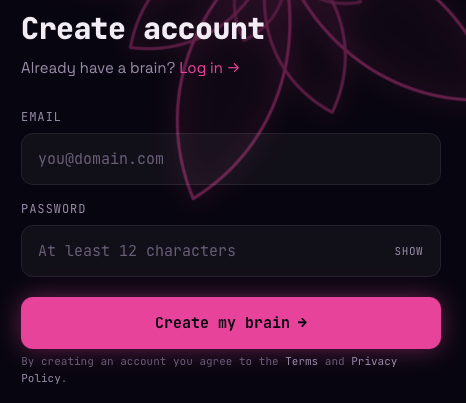
Sign-up: no phone number, no SMS consent required.
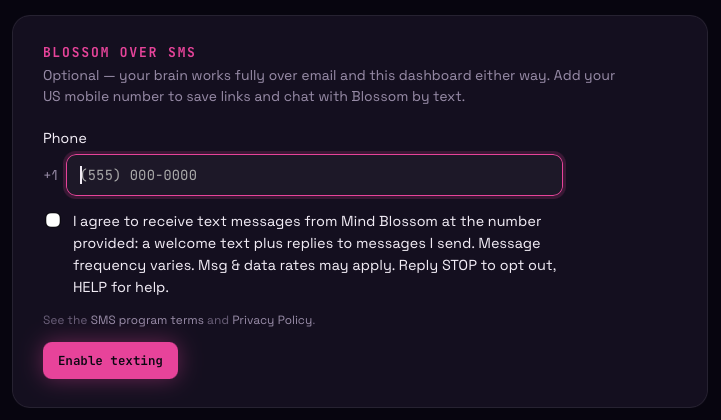
Settings → Blossom over SMS: the consent checkbox is unchecked by default and the section can be skipped entirely.
Program terms
- Message frequency varies: the service replies to messages you send it, plus a one-time welcome message when you enable texting.
- Message and data rates may apply.
- Opt out: reply STOP to any message to cancel. You will receive a final message confirming the opt-out, after which no further messages are sent to your number.
- Help: reply HELP to any message, or contact [email protected].
- No mobile information is shared with third parties or affiliates for marketing or promotional purposes. See the Privacy Policy.
- Carriers are not liable for delayed or undelivered messages.
Full terms: Terms of Service · Privacy Policy